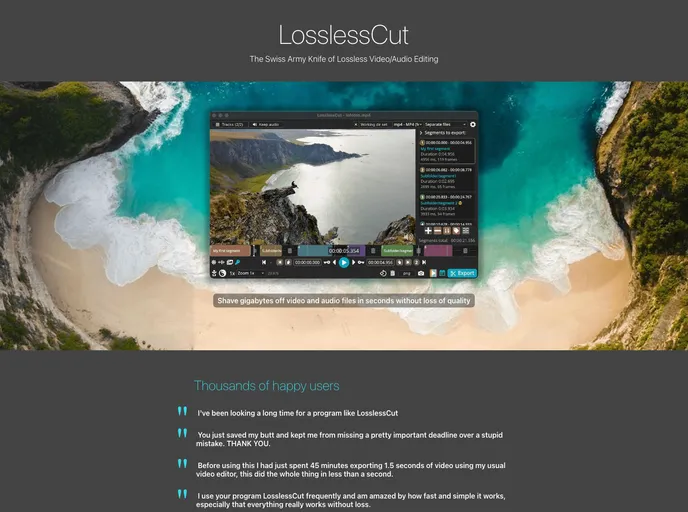
Lossless Cut screenshot

Lossless Cut

Author Avatar Theme by Mifi
Updated: 18 Jan 2026
37296 Stars

The swiss army knife of lossless video/audio editing

Categories

Overview

LosslessCut is a powerful, cross-platform FFmpeg GUI designed for rapid and lossless operations on various media files, including video, audio, and subtitles. Its primary appeal lies in its ability to cut and trim video and audio files without sacrificing quality, making it an ideal tool for content creators who require efficiency without compromising their projects. Whether you’re dealing with large files captured from cameras, drones, or GoPros, LosslessCut allows you to quickly extract the essential parts and discard unwanted data, proving to be an invaluable resource for anyone working with multimedia content.

This software is not just limited to trimming; it boasts a range of features that cater to different user needs. The intuitive interface, backed by the robust capabilities of FFmpeg, enables users to perform a multitude of actions swiftly. From merging and rearranging audio/video segments to extracting specific tracks, LosslessCut makes handling media files simpler and more effective.

Features

  • Lossless Cutting: Cut and trim most video and audio formats without any loss of quality, perfect for removing unnecessary parts of your files.
  • Smart Cut (Experimental): An advanced feature that allows for cutting out parts of media intelligently, such as removing commercials.
  • Lossless Merging: Seamlessly merge multiple files with identical codec parameters, eliminating any need for re-encoding.
  • Multi-Track Editing: Combine or modify multiple audio tracks and subtitle tracks from various files to create a rich media experience.
  • Snap and Export: Take full-resolution snapshots and export video frames in JPEG/PNG formats, with various options for timestamps and scene changes.
  • Customizable Workflow: Utilize a keyboard shortcut workflow and customize hotkeys for a more efficient editing process.
  • Advanced Metadata Control: View and edit technical data about tracks, as well as file metadata, offering detailed control over your projects.
  • Segment Management: Save and import/export cut segments in various formats such as MP4, MKV, and CSV, making project organization and collaboration seamless.