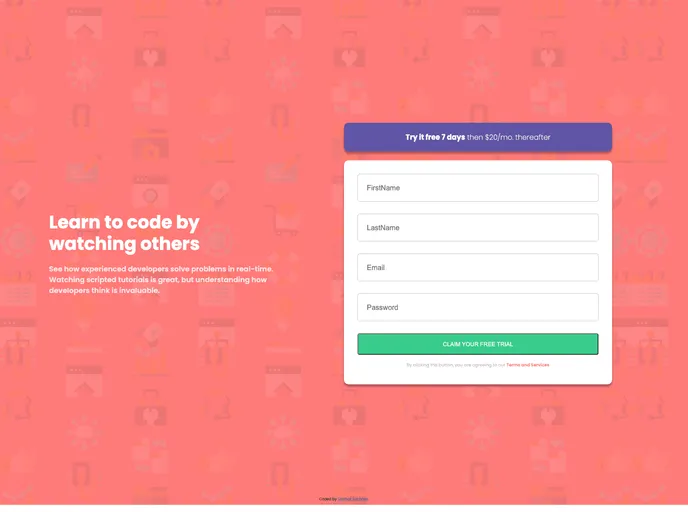
Intro Component Signup Form_frontend_project screenshot

Intro Component Signup Form_frontend_project

Updated: 10 Oct 2024
11 Stars

Enroll in our coding course with ease using the Intro Component Signup Form! This signup component allows users to view the optimal layout for the site depending on their device's screen size, receive error messages when the form is submitted if any input field is empty or if the email address is...

Categories

Overview

The Intro Component Signup Form is a thoughtfully designed solution that streamlines the enrollment process for coding courses. This component not only enhances user experience but also prioritizes accessibility by adapting its layout to fit various devices. By ensuring optimal design and functionality across all screen sizes, it makes signing up for courses a breeze.

With features like interactive hover states and precise error messaging, users are guided seamlessly throughout the signup experience. This component stands out by providing clear feedback when input errors occur, ensuring that no one is left in the dark regarding form submissions.

Features

  • Responsive Design: Automatically adjusts layout based on screen size, ensuring a user-friendly experience on any device.
  • Hover States: Provides visual feedback for all interactive elements, enhancing user engagement and navigation.
  • Input Validation: Implements JavaScript to validate fields like first name, last name, and email, reducing errors and improving accuracy during submission.
  • Error Messages: Offers real-time error notifications for empty fields or incorrectly formatted email addresses, guiding users to correct their input.
  • Optimized Assets: Includes pre-optimized assets in the design folder, simplifying the integration process for developers.
  • Comprehensive Style Guide: Accompanied by a style-guide.md file that outlines color palettes and font choices for consistent design application.